
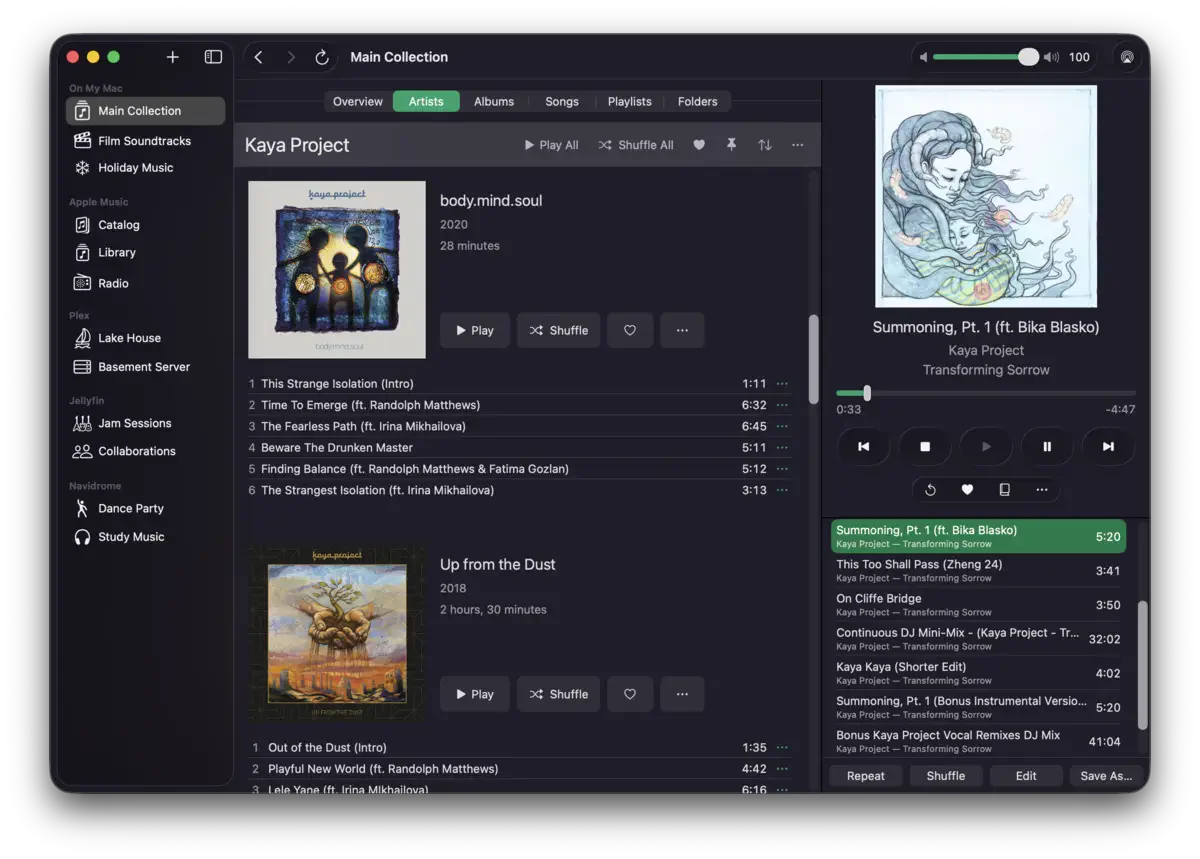


Apple had a clear choice when it sunset iTunes in 2019. It could have built a focused, capable music app for people with real collections — the kind of listeners who buy albums, tend their metadata, and treat their library as something accumulated deliberately over years. Instead it built something closer to a streaming service storefront with a file player stapled to the side. Radiccio, a new Mac app from Sacramento’s Crispy Crunchy Computerware, is what happens when a seasoned software engineer gets tired of waiting for someone else to fix that.
One App, Every Source
The concept is direct: your music doesn’t live in one place, so your player shouldn’t either. Radiccio connects to local files on your Mac, Apple Music, and a full set of personal media servers — Navidrome, OpenSubsonic, Plex, and Jellyfin — all from a single native interface built with SwiftUI and AppKit.
Each connected library is treated as a discrete “source” you switch between from the sidebar. That design solves a specific frustration: the ability to segment a large collection into separate logical libraries — a jazz folder, a classical server, a purchased downloads pile — while keeping them all accessible from one place. No existing Mac player handled that kind of structured separation without throwing everything into one undifferentiated view.

The Features Apple Didn’t Ship
Three tools stand out beyond standard playback. Pins surface specific albums or artists to the top of any source — useful when you’re deep into a listening project and want certain records always visible. Auto Skip flags tracks to pass over during playback without removing them from the library; you can still force-play them when you actually want to. And Journal is the most interesting thing in the app: instead of star ratings, it records a timestamped, multi-part reaction to a song — enjoyment level, mood (including custom emoji), and freeform notes. The idea is building a record of how your feelings about a piece of music shift over time. The developer calls it “having a conversation with your past self about it.” That’s a more honest description of how listening actually works than a five-star scale has ever managed.
Worth flagging: Pins, Auto Skip, and Journal currently work only with “On My Mac” and Radiccio Server sources. Apple Music and third-party server connections don’t get these tools yet. If Plex is your main library, that’s a meaningful gap — and one to keep an eye on as development continues.
Speaking of which — a few weeks in with Radiccio on Apple Music (both streaming and local files) and with a Plex collection, everything has been smooth. No hiccups, no weird edge cases, nothing to report except that it just works. That’s not nothing for a v1 from a one-person shop.

The Server Underneath
Radiccio also includes a built-in OpenSubsonic server. Your Mac becomes a streaming node, accessible from any OpenSubsonic-compatible player on iPhone or other devices — no cloud account, no third-party service holding your music. It runs over LAN; for access outside the home you’d need to add a mesh VPN like Tailscale. That’s a separate setup step, but also a deliberate stance: the infrastructure stays local, under your control.

The server requires Radiccio Plus!, so it’s not part of the free tier.

The Honest Case Against Lock-In
The developer — who goes by dmd, and lists almost two decades of professional software engineering behind them — is straightforward about what Radiccio is pushing back against. Apple Music corrupting personal libraries with duplicates, lost tracks, unwanted metadata overwrites. Streaming’s tendency to make music feel disposable. And a specific, practical concern about lock-in that has gotten harder to ignore as Apple’s Music app has made it progressively more difficult to extract your own library.
Radiccio sidesteps this by design. Your files stay in your own folder structure, in standard audio formats. The app doesn’t touch your metadata or reorganize anything without your say-so. Leave the app tomorrow and you take everything with you.
The honest counter: Journal entries, Pins, and Auto Skip flags are Radiccio-specific data. That curatorial work doesn’t export anywhere. It’s a much smaller dependency than having your music files held hostage — but it’s real, and worth naming for anyone planning to invest heavily in the Journal over time.
What the app currently lacks in terms of customization: interface color theming and keyboard shortcut remapping aren’t options yet. For a tool built around daily listening habits, that feels like an area where the developer could open things up. Hopefully on the roadmap.
One last thing — and this is a question more than a critique: the vegetable is spelled radicchio, with a double-c and an h. The app is spelled Radiccio, dropping the h. There’s no explanation on the website or in the App Store description, so whether this is deliberate wordplay, a stylistic choice, or just a quirk of the name is anyone’s guess. As an Italian speaker, it’s the first thing I noticed. It doesn’t affect how the app plays music, but I’d love to know the story.
If any of this resonates — a growing local collection, frustration with Apple Music’s handling of personal files, a Navidrome or Plex server sitting underused — it’s worth an afternoon with Radiccio. The free tier costs nothing and asks for nothing in return, so the barrier to finding out whether it fits your workflow is essentially zero. Small apps with clear points of view don’t come along that often. This one deserves the attention.
Pricing and Availability
Radiccio is available now on the Mac App Store. The free tier covers one “On My Mac” source and Apple Music — no time limits, no ads, no nagging. The developer is explicit that this will remain the case permanently, as a standing alternative to the free macOS Music.app.
Radiccio Plus! adds unlimited local sources, Navidrome, OpenSubsonic, Plex, and Jellyfin support, and the built-in Radiccio Server. Pricing is $2.99/month or $29.99/year, with a free trial for eligible customers. A one-time perpetual license is available at $99.99 — an option that matters a lot if your whole reason for being here is to stop paying recurring fees to someone else.
Full details and the user guide at radiccio.music.


