

Solderbox, the latest creation from Jakob Haq and Bram Bos, is a semi-modular synthesizer designed for iOS and Mac platforms. This app brings the intricate world of modular synthesis to a digital format, offering an affordable, accessible, and highly creative tool for sound design enthusiasts. With its roots in West Coast modular synthesis and a hybrid approach that incorporates East Coast techniques, Solderbox is both beginner-friendly and rewarding for experienced users.
Solderbox Review At a Glance – Pros & Cons
Pros:
- Combined expertise
- Affordable entry point into modular synthesis ($12.99).
- Universal purchase for iOS and Mac platforms.
- Compact download size (<10MB) with minimal CPU footprint.
- Beginner-friendly yet deep enough for advanced users.
Cons:
- Predefined modules may feel limiting to some users.
- Switching between upper and lower halves could be more seamless (improvements are reportedly in progress).
- Preset browsing requires menu navigation instead of simpler back-and-forth options.
Background and Development
Jakob Haq and Bram Bos are no strangers to the world of modular synthesis. Haq has worked on apps like Agonizer and Shockwave with Kai Aras. Bos has an extensive history in music software development, dating back to his HammerHead Drum Machine in the late ’90s and he’s the mastermind behind classic iOS apps such as Ripplemaker.

Solderbox reflects their combined expertise, drawing inspiration from Haq’s personal modular setup, the “HaqRaq MOOdular V1,” which emphasizes unique sound design and spontaneity.
The app has been more than a year in the making, with its modules modeled after Haq’s modular trials. As a result, Solderbox feels like a labor of love—a digital representation of their dedication to modular synthesis.
Design and Normalization
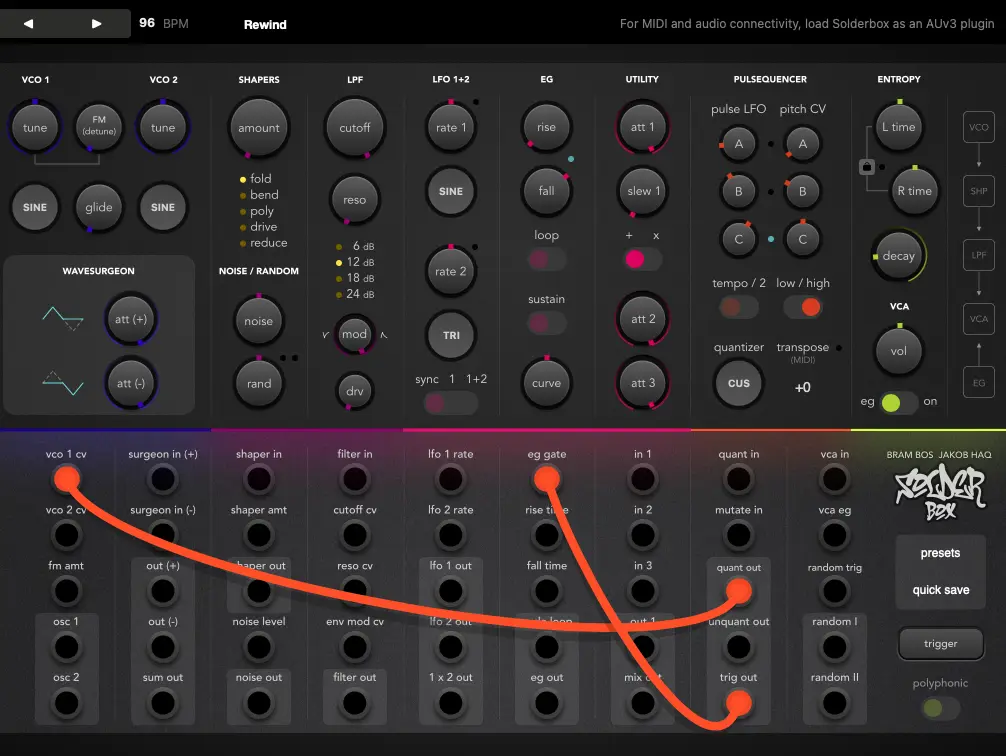
Solderbox is divided into two main sections:

- Top Half: Displays the signal path with pre-configured modules.
- Bottom Half: Features 45 color-coded patchpoints for manual routing.
The app’s “normalized” design simplifies the learning curve by pre-soldering certain connections in the background. For example:
- Oscillator 1 (VCO) feeds into the SHAPERS module.
- The SHAPERS feed into the LPF (Lowpass Filter Section).
- The filter output is sent to the VCA (Amplifier).
This allows users to play Solderbox as a traditional synthesizer without additional patching. However, those seeking deeper customization can override these connections by manually patching cables into corresponding inputs.
Modules Overview
Solderbox includes 12 modules (counting both VCOs as one), each offering unique functionality:
- VCO Oscillators 1+2: Dual oscillators with tuning, FM detuning, glide, and wave shape controls.
- Wavesurgeon Module: Combines oscillator waves through slicing and re-splicing.
- Shaper Modules: Wavefolding effects like Fold, Bend, Poly, Drive, and Reduction.
- Noise & Random Module: Introduces randomness and noise elements.
- LPF Module: A proprietary low-pass filter with multiple slope options (6–24 dB).
- LFO 1+2: Two low-frequency oscillators with shape and rate controls.
- EG (Envelope Generator): Time-variant signal generation with rise/fall attenuators and loop/sustain options.
- Utility Module: A versatile mixer with built-in filtering and macro control capabilities.
- Pulsequencer: A quantized sequencer that creates musical sequences grounded in scale or custom note patterns.
- VCA Module: Controls volume with options for synth or drone modes.
- Entropy Module: A delay effect with independent or synchronized controls.
Patchwork System
The patching process is intuitive:
- Drag cables from outputs to inputs to create connections.
- Patchpoints are color-coded for easy navigation (Blue, Purple, Pink, Orange, Yellow).
- Cables can be recolored by double-tapping them for better organization.
This system encourages experimentation without fear of breaking anything. Mistakes are easily corrected by re-patching cables.
Unique Features
Solderbox introduces several standout features:
- Instability Engine replicates analog inconsistencies like crosstalk and component variations, giving patches a “breathing” quality.
- Patch regeneration – On iPad, double-tapping the logo regenerates the current patch (not available on Mac).
- Compact size (<10MB) and low CPU usage make it ideal for stacking multiple instances in hosts like AUM or DAWs like Logic Pro.
Feedback on Experience
Modular synthesis can be an expensive hobby, but Solderbox offers an affordable entry point. At $12.99 for both iOS and Mac versions (universal purchase), it provides a fraction of the cost of even a single hardware module. Its user-friendly interface makes it an excellent learning tool for beginners while still offering depth for seasoned users.
For newcomers like myself, Solderbox served as an accessible introduction to modular synthesis. The clear labeling of patchpoints and intuitive design made it easy to grasp fundamental concepts while exploring complex sound design possibilities. Watching patches “play themselves” through generative methods was particularly rewarding.
Pricing and Availability
Solderbox is available on the iOS App Store and Mac App Store as a universal purchase for $12.99. You can support Jakob Haq via his Patreon or explore Bram Bos’s other apps on iOS.
Solderbox Review – Final Thoughts
Solderbox is an innovative tool that bridges creativity with technical exploration. Its affordable price point, intuitive interface, and unique features make it a must-have for anyone curious about modular synthesis. Whether you’re just starting out or looking for a portable solution to expand your sound design toolkit, Solderbox delivers an engaging experience that rewards patience and experimentation.