


The CHOMPI hardware sampler is dead. Chase Bliss confirmed its discontinuation at the end of September 2026, just over a year and a half after acquiring CHOMPI Club from founders Chelsea and Tobias — a deal that was supposed to signal a new chapter for the scrappy, screenless sampler. Instead, that chapter closes with a GitHub repository and a free plugin.
The good news: within days of the open-source announcement, Temecula DSP stepped up. Coming hot on the heels of their highly praised DEEP/4 and MDV II (MidiVerb II) effects plugins, they dropped NIBBI, a free VST3/AU/AAX plugin that lifts the CHOMPI’s TAPE-mode workflow — seven-voice sampling, tape-style looper, single-knob effects — and runs it inside your DAW. It is free. It ships with factory samples. It works. But it also asks you to do something the CHOMPI was designed specifically to stop you from doing: stare at a screen.
CHOMPI is Dead. Long Live NIBBI
CHOMPI Club launched the original CHOMPI around 2022 as a direct response to a specific problem. Chelsea and Tobias had spent years running music education programs in Washington state, and they kept watching students freeze in front of computers. The CHOMPI’s pitch was blunt: no screen, flip a switch, make a sound. Its design — bright colours, physical keys, a deliberate absence of menus — made it an outlier in a market full of gear that demanded your full visual attention.

The instrument’s simplicity was real but not shallow. TAPE mode let you sample any sound, spread it chromatically across the keyboard, and build layered loops directly on the hardware. Chase Bliss, whose reputation rests on maximally expressive guitar pedals like the Generation Loss Mk2, saw a natural alignment and moved in March 2025. The acquisition narrative hit every expected beat: shared community values, better support infrastructure, new production run incoming, hardware and firmware roadmap ahead.
Eighteen months later, manufacturing pressures won. The CHOMPI 1.5 that was reportedly explored never materialised. Chase Bliss released the full hardware and firmware files — schematics, PCB designs, TAPE 2.0, TEMPO 1.0, and the new beta WAVE wavetable synth firmware — under an MIT licence on the CHOMPI Club GitHub. It is the most generous possible sunset for a niche instrument.
NIBBI by Temecula DSP arrived almost immediately after.
What NIBBI Actually Is
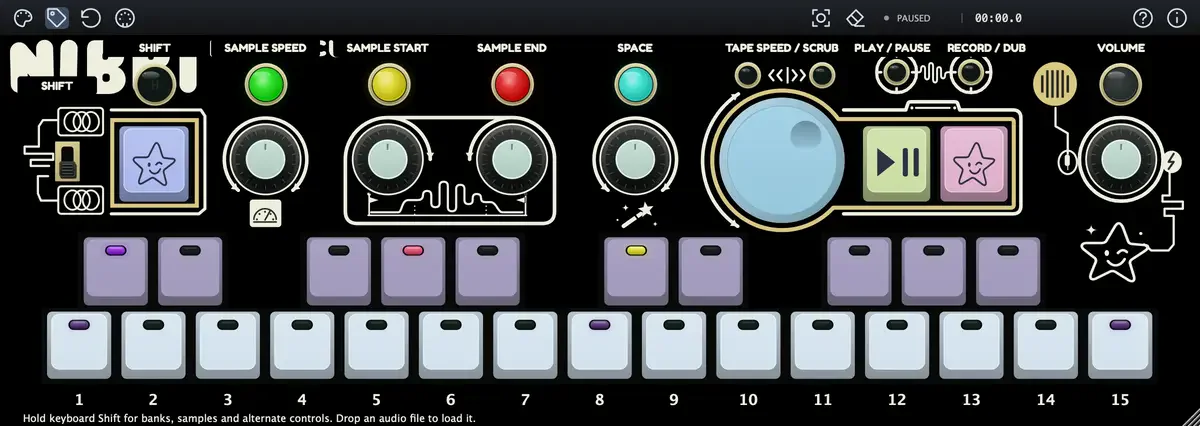
Think of it as CHOMPI’s TAPE mode translated into plugin format, with the desktop build currently locked to that same tape-centric workflow. Load it on an instrument track in Logic, Ableton, or any AAX-compatible host, and the layout will be immediately legible to anyone who has spent time with the hardware.

The signal chain works left to right. The periwinkle Sample button captures incoming audio from your DAW’s routed input; you can also drag-and-drop any audio file directly onto the panel and it converts on arrival. From there, three knobs handle the fundamentals — Sample Speed (which changes pitch and direction together, including reverse), Sample Start, and Sample End — while a wand knob cycles through three effect pages: Space (delay and reverb combined on a single knob), Saturation (drive plus tape warble via Shift-turn), and Filter (low-pass to high-pass sweep, with resonance on Shift). Seven voices of polyphony run simultaneously without voice stealing drama.
The tape looper sits at the centre. First press of the mauve Record/Dub button starts recording. A second press at the end of your phrase closes the loop and drops straight into overdubbing. Third press returns to playback. That three-press workflow is identical to the hardware. The large blue tape wheel adjusts speed and direction while playing, or scrubs position when paused.

MELO and HITKIT modes mirror the hardware too. MELO spreads one sample chromatically across the keyboard — up to 14 stored slots across five banks, plus a shared live buffer on key 15. HITKIT puts different one-shots on individual keys for drum kits or phrase banks. Five banks per mode, labelled A through E; banks A to C come pre-loaded with factory recordings.
Effects Placement Is the Detail Worth Knowing
One architectural decision that separates NIBBI from a simple sampler: you explicitly choose where the effects sit relative to the tape. Shift + raised key 6 places them before the looper, meaning each overdub prints its own effect treatment into the loop permanently. Shift + raised key 7 places them after, so the effects process the combined playback as a whole. The difference in practice is significant. Pre-tape saturation means each layer can have its own distortion character. Post-tape filter means one cutoff sweep reshapes the entire loop. Neither position is hidden in a menu — it’s a lit key, always visible.
The effects are genuinely usable rather than cosmetic. Tape warble (via Shift-turn on the Saturation page) adds wow and flutter independently of drive amount. The Space page combines delay and reverb into one amount knob, with delay time accessible via Shift-turn. For the kind of ambient loop-building CHOMPI users were already doing, that level of control in five knob-positions is efficient rather than limited.
But the Whole Point Was No Screen
Here is the friction point: CHOMPI’s entire design philosophy was the absence of a screen. The hardware enforced focus. NIBBI puts that same workflow into a DAW plugin window, surrounded by your session, your notifications, your browser tab with the email you haven’t answered. The CHOMPI was an ANR Top Pick precisely because it invited exploration without demanding attention.
Temecula DSP has made NIBBI’s interface as clear as a plugin reasonably can be — illustrated labels toggle on and off via a toolbar icon, knob feedback bubbles appear contextually as you turn them, waveform previews update in real time — but none of that changes the fundamental medium shift. The people who loved CHOMPI most are likely the ones who will find a DAW plugin the least satisfying replacement.
That said, NIBBI solves a real problem for a different audience: producers who wanted the CHOMPI’s looping and sampling logic inside a session without buying hardware. For them, the absence of a screen was never the point.
MIDI Learn: Capable, With One Catch
NIBBI ships with a default MIDI CC map (CC 20 through CC 33 covering every encoder and both transport buttons), and its MIDI Learn mode is genuinely well-implemented — it auto-detects relative and absolute encoder formats, stores named maps, and even handles drum pad momentary assignments correctly.
The catch is right there in the manual: stock CHOMPI hardware cannot fully control NIBBI. The physical sampler doesn’t send a distinct CC for every panel action. If you own a CHOMPI and assumed it would work as a dedicated controller for the plugin version — it won’t, not completely. The hardware’s purple button has no independent Shift CC; encoder pushes largely share CCs with their rotation. Temecula DSP flags this honestly in the documentation, and suggests using a separate controller with distinct CCs for full coverage. But it’s still a friction point for anyone hoping the two would pair naturally.
Pricing and Availability
Temecula DSP NIBBI is available now as a free download for macOS and Windows in VST3, AU, and AAX formats. The standalone desktop app is also available. Factory samples are included; no additional library purchase is required.
Download and full documentation at temeculadsp.com/nibbi.
The CHOMPI hardware is discontinued. The full open-source hardware and firmware files (TAPE 2.0, TEMPO 1.0, WAVE 1.0 wavetable beta) are available on the CHOMPI Club GitHub under an MIT licence. Community discussion continues in the CHOMPI Open Source channel on the Chase Bliss Discord.


