
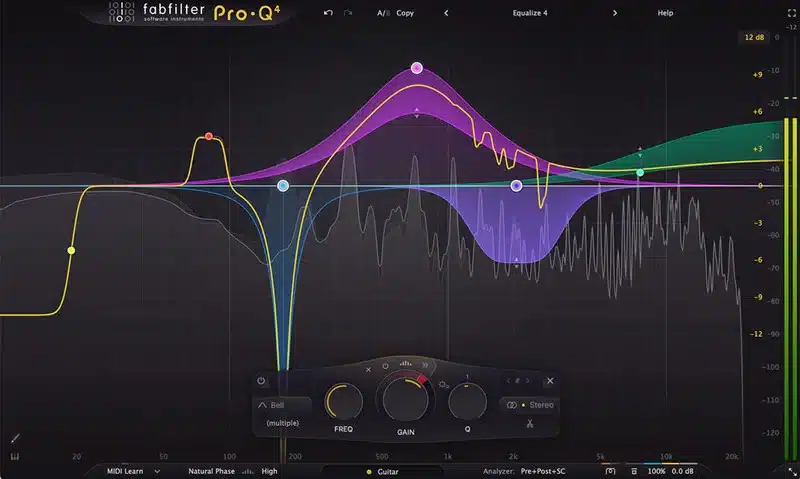


Overview of FabFilter Pro-Q 4
FabFilter Pro-Q 4 is the latest version of the acclaimed Pro-Q series, a favorite among audio engineers for its intuitive interface, precision, and advanced features.
As a long-time user of Pro-Q in its various iterations (check out my FabFilter Pro-Q 3 review), I was excited about the upgrade. Partially, I was thinking, “Man, Pro-Q 3 is so good, what else would I need? Is it just going to be feature bloat that I have to wade through, which will ruin the workflow?”
This review explores the key updates in Pro-Q 4 and whether it’s worth upgrading from previous versions.
What’s New in Pro-Q 4?
FabFilter Pro-Q 4 introduces over 50 updates and improvements.
FabFilter has introduced several significant improvements in Pro-Q 4. The website lists at least 50 changes or enhancements.

Thankfully, the GUI hasn’t been altered much. That is BY FAR the best element of the Pro-Q series—being able to see bands and visualize the incoming/outgoing signal so immediately and precisely is the most useful thing to me. The GUI has undergone a bit of a facelift, but nothing major.
Here are the most notable enhancements:
1. Dynamic EQ Enhancements
- Expanded threshold control for precise adjustments.
- Improved gain-reduction visualization.
- New filter shapes for greater flexibility.
This is a useful alternative to multiband compression—I use the dynamic element of the EQ fairly consistently in mixes. However, I have found the parameter control lacking; it’s automatic, and there’s essentially no control beyond the amount.
With Pro-Q 4, the controls are expanded significantly, offering more precise control over threshold settings and improved visualization of how the gain is reduced. They’ve also added some extra filter shapes, which is excellent.

2. Spectral Magic
The new spectral dynamics process is very interesting. It’s sort of like Oeksound Soothe—although a lot less involved. Spectral dynamics is essentially a more subtle version of dynamic EQ: Pro-Q 4 will dampen specific narrow frequencies that break the threshold on the band you’ve selected without dampening the entire band.

This is particularly useful for removing harshness in sound without significantly altering the timbre of the original sound. It’s definitely not as detailed as software like Soothe, but having it built-in and able to fix problematic frequencies is an extremely helpful tool.
3. Performance Optimization
One of the most substantial upgrades comes in performance optimization. Pro-Q 4 shows remarkably lower CPU usage compared to its predecessor, especially when running multiple instances. I tend to use Pro-Q on every channel, and especially when using Linear Phase mode, the CPU count has been significant. This has reduced it massively, which is incredible. That may not be a particularly sexy improvement, but in terms of usefulness, it’s at the top for me.
4. Workflow Improvements
- Instance List Window: Manage all instances of Pro-Q in your session from one interface.
- Spectrum Grab Tweaks: Create multiple EQ bands by dragging peaks in a frozen spectrum.
- EQ Sketch: Draw EQ curves for a quick starting point.
So, Should You Upgrade To Pro-Q 4? And What If You Don’t Have Any Version of Pro-Q?
I know, many of you are wondering, is Pro-Q 4 worth the upgrade? Well, unfortunately, that decision is yours and yours alone!! I will say that Pro-Q 4 is a feature improvement, rather than ‘WOW DROP EVERYTHING AND BUY NOW!!’
But I think Fabfilter have made incremental and very useful workflow improvements without creating feature bloat, and just too many knobs and buttons to deal with.
If you’re a heavy user of the EQ – I would suggest seriously taking a look at it. Fabfilter do offer generous upgrade discounts to their loyal users. But if you’re happy w ProQ3, I don’t think you’re really missing out if you stick with that version.
However – If you don’t have any version of Pro-Q EQ, stop messing about and purchase FORTHWITH! It’s just the best EQ out there! (IMHO!) At the very least, get the free trial and give it a go!
Wrapping it up:
- For Pro-Q 3 Users: If you rely heavily on dynamic EQ or run large sessions, the performance improvements and workflow enhancements make this upgrade worthwhile.
- For New Users: Pro-Q 4 is one of the best EQ plugins available today, combining ease of use with advanced features.
- For Casual Users of Pro-Q 3: If you’re content with your current setup, the upgrade isn’t essential but offers meaningful improvements.
Pricing and Availability
FabFilter Pro-Q 4 is priced at $179 for new users, with upgrade discounts available for existing customers. For more details or to purchase, visit FabFilter’s official product page. It’s also available on Plugin Boutique, where you may find additional offers or bundles.


