There is a particular kind of instrument that bypasses music theory entirely. You don’t voice the chord; you pick it. You don’t program a strum pattern; you sweep a finger across a plate and the thing shimmers. The Suzuki Omnichord worked that way when it appeared in 1981, and it still sounds immediately musical in a way that a piano keyboard — for all its logical beauty — rarely does on first contact.
Konstantin Schütz, an independent developer based in Berlin, built Omnisound around that exact logic. The app launched on iPhone and iPad as a standalone instrument, and version 1.1 now brings AUv3 plugin support and full MIDI in/out. It works. It sounds good. And at $0.99, it’s one of the better-value entries in this corner of the iOS music space.

What Omnisound Actually Does
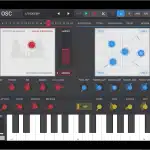
The interface divides into three clear zones. A grid of 36 chord buttons — 12 roots across major, minor, and seventh rows — handles harmony. Long-press any button and it cycles through extended voicings, so your C major doesn’t have to stay a plain triad. Next to that sits the strum plate, spanning four octaves, with a HOLD/TAP switch that decides whether a chord rings until dismissed or cuts the moment you lift your finger.
Six chord voices and five string voices cover a lot of textural ground, and two blendable harp layers let you mix the classic plucked attack with a pad-ier sustain underneath. Ten rhythm patterns with auto-bass fill out the tempo side, while a chord-memory sequencer captures and replays progressions. There’s a built-in melody keyboard on top of all that, plus transpose and per-part level and tone controls. The feature count at this price is genuinely impressive.
ANR covered the Suzuki Omnichord OM-108 return a while back — a hardware revival that arrived at several hundred dollars and leaned heavily on nostalgia. Omnisound is working the opposite angle: digital, inexpensive, and built to live inside a session workflow rather than beside it.

Omnisound AUv3 in Practice
The version 1.1 update is the one that opens Omnisound up to producers who want it to do more than generate ideas on a sofa. AUv3 drops it into GarageBand, AUM, Logic, and any other iOS host that handles the spec — and with MIDI out, it can drive external instruments or record directly to a MIDI track rather than just printing audio.

One practical thing to know: the strum plate, which is the instrument’s most expressive surface, feels slightly compact when loaded inside an AUv3 plugin window. This is more an inherent challenge of the format — fitting a touch-first, full-screen instrument into a host’s constrained plugin view — than anything specific to Omnisound. Standalone use gives you the full layout and feels great. In a host, you adapt. Schütz has included host preset support and parameter automation, which is exactly the right approach for a v1.1 and more than many established developers bother with.
MIDI in means you can drive Omnisound from a hardware keyboard, removing any need for the chord button grid if you prefer playing harmony directly. MIDI out opens up a more interesting workflow: use Omnisound’s voicings to generate chord MIDI and route it to a pad synth or sampler, keeping the harmonic logic without using its own voices.
A Growing iOS Niche
Omnisound isn’t alone in this space, and that’s worth knowing. C.ARP, developed by Paolo Giorgi, has been the go-to Omnichord-style app on iOS for years — a well-loved standalone instrument with rhythm sections and a loyal community, though it still lacks AUv3 support.
More recently, Omni: Pocket Synth arrived in June 2026 from developer Rubén Terrón Rodríguez: it takes the Omnichord concept and wraps it in a wavetable and virtual analog engine with AUv3 and its own arpeggiator and drum section, available free with a pro IAP. Haura, an OM-84-focused emulator, has been in development for iOS with a commitment to synthesis rather than samples.
Omnisound sits alongside these with its own clear identity: the retro voice palette, the strum plate, the self-contained rhythm section, and now a clean AUv3 implementation. Where Omni: Pocket Synth leans into synthesis flexibility, Omnisound leans into the original Omnichord experience — immediate, warm, and uncomplicated. For $0.99, it’s worth having both.
What makes v1.1 particularly notable is that Schütz has delivered MIDI I/O, host presets, and parameter automation as a one-person project at under a euro. That’s the kind of effort that tends to get overlooked when it comes from an indie developer rather than a label with a marketing budget. If you’ve been curious about the Omnichord concept on iOS and wanted something that could actually slot into a session, this is a good moment to pick it up.
Pricing and Availability
Omnisound is available now on the App Store for $0.99 / €0.99. Requires iOS 17 or later; runs on iPhone and iPad as a standalone app and as an AUv3 plugin, and on Mac via the AUv3 plugin bridge.