

Blue Cat Audio has released Remote Control 3.2, a major free update to its virtual MIDI control surface plug-in and standalone app, built for controlling multiple plug-ins or MIDI devices from a single, customizable interface. The company is also running end-of-year promotions across its range through December 31, with discounts of up to 50%.
Remote Control sits in that sweet spot between “MIDI mapping utility” and “performance macro panel”, especially for anyone tired of diving into different plug-in GUIs just to ride a few key parameters.
A redesigned UI that’s actually meant to be built on
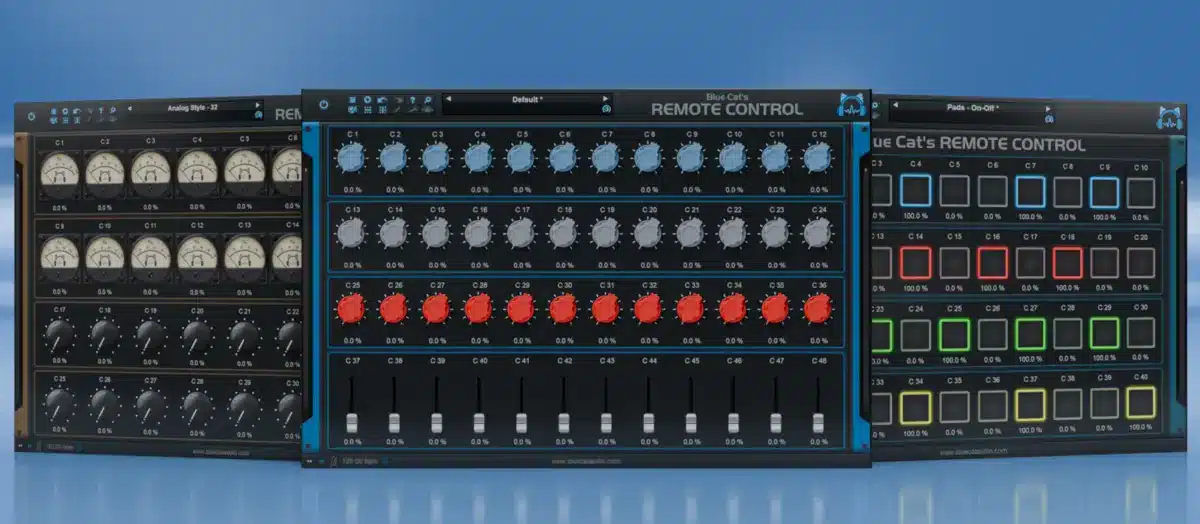
The headline change in 3.2 is a fully redesigned, customizable interface. You can create your own grid layouts and populate them with more than 40 control types, including knobs, sliders, pads, buttons, and new momentary pad controls.

It also adds a practical organizational touch: you can change the background color per instance, which is handy when multiple Remote Control instances are open across a session.
If you use a touchscreen (or a touch-enabled laptop), 3.2 adds multi-touch support on Windows, so multiple controls can be moved at the same time. Blue Cat also doubled the control ceiling from 64 to 128 parameters, which matters when you want one surface to drive an entire channel strip or a layered instrument stack.
Better MIDI support and proper sync options
Remote Control 3.2 expands MIDI event support beyond standard CC, adding MIDI notes, pitch bend, NRPN, 14-bit CC, and aftertouch/channel pressure. MIDI Thru is also included, letting MIDI events pass through the plug-in.

For the standalone app, there’s improved synchronization support via MIDI Beat Clock or MIDI Timecode (MTC), useful if you’re trying to keep external hardware, apps, or a second computer locked to a master tempo or transport.

How it fits into a real workflow
Remote Control makes the most sense when you treat it like a “personal control layer” that stays consistent across projects. Build a handful of surfaces for recurring tasks, like a synth macro page (filter, envelope, drive, reverb send) or a mix page (vocal ride, de-esser depth, delay feedback, reverb level), then reuse them instead of remapping from scratch every session.
The new UI and higher parameter count in 3.2 also make it much more viable as a performance panel for hybrid rigs. For example, mapping one page to control a hardware synth via NRPN while another page drives plug-in parameters via CC or automation.
Video Overview
Here’s a solid overview video you can watch to see the core concept and workflow in action:
Pricing and Availability
Remote Control 3.2 is a free update for existing customers, and a demo is available.
Blue Cat Audio is offering Remote Control for 39 EUR/USD (down from 49) until December 31.
Product page: Blue Cat’s Remote Control
Plugin Boutique listing: Blue Cat’s Remote Control at Plugin Boutique
Blue Cat Audio’s end-of-year promotions run until December 31, with discounts of up to 50% on plug-ins and applications. Existing customers can receive additional personalized offers via email during the promotion period.
Final Thoughts
Remote Control 3.2 is a thoughtful update that addresses real workflow pain points. If you’re managing complex signal chains or hybrid setups, it’s well worth exploring, and for existing users, the free update is a no-brainer.