Arturia Keylab MK3
- Build Quality
- Features
- Ease Of Use
Arturia Keylab Mk3 Review
Having previously tested the KeyLab Essential, I was curious to see how the new Arturia’s flagship MIDI controller, the KeyLab MK3, would stack up.
Here’s why it has become my current main MIDI controller…

Pros and Cons
Pros:
- Premium build quality with an attractive design
- Improved keybed with aftertouch
- Vibrant full-color display
- Excellent integration with Arturia software
- Versatile creative features (arpeggiator, chord mode, scale mode)
- Comprehensive DAW integration options
Cons:
- Removal of CV outputs may disappoint some users
- No polyphonic aftertouch or MPE support
- Slightly fewer pads compared to the MK2 (12 vs 16)
Arturia KeyLab MK3: A Hands-On Journey & In-Depth Review
As a producer and music tech enthusiast, I’ve encountered my fair share of MIDI controllers, but the Arturia KeyLab MK3 genuinely caught my attention. Having tested its sibling, the KeyLab Essential MK3, I was curious to see how this flagship model would stack up. Let’s explore what makes this sleek controller stand out—while also addressing considerations for KeyLab MK2 owners.
First Impressions: Eye Candy Meets Functionality
When I first unboxed the KeyLab MK3, I couldn’t help but admire its design. Arturia has really elevated the look with a metal chassis and wooden side panels. It’s like upgrading from a dependable sedan to a classy sports car; both will get you there, but one does it with more style. Available in “look at me” white or “stealth mode” black (my pick), it’s undeniably attention-grabbing.
Versions & Pricing
To suit different needs, Arturia offers two configurations:
- KeyLab 49 MK3 (49 keys) at USD $499 / EUR €499
Buy it in Black – Buy it in White - KeyLab 61 MK3 (61 keys) at USD $599 / EUR €599
Buy it in Black – Buy it in White
Both come in black or white. This premium price reflects the enhanced build quality, expanded features, and bundled software compared to the Essential line.

Keys That Make You Want to Play
Arturia’s semi-weighted keybed feels like a sweet spot between synth action and hammer action. Compared to the KeyLab Essential MK3, these keys offer aftertouch for added expression. Whether you’re a piano-trained player or an EDM producer, the tactile feedback is satisfying, and channel aftertouch allows for nuanced performances—perfect for soaring leads or evolving pads.
A Screen That Speaks Volumes
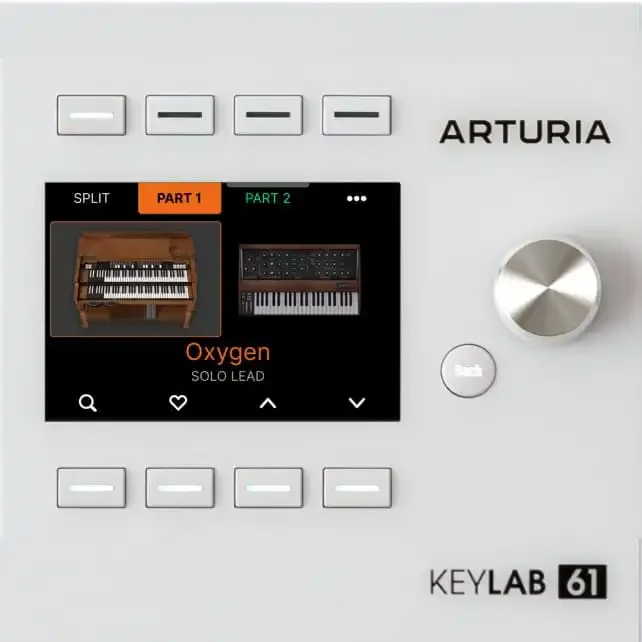
Gone are the days of squinting at tiny screens. The KeyLab MK3 features a 3.5-inch full-color display that provides at-a-glance parameter feedback, preset browsing, and adjustment cues. If you’ve used the Essential MK3’s monochrome OLED, think of this as a jump from black-and-white TV to 4K. It’s not just about prettier visuals; it makes navigation significantly more intuitive. This is a big plus for me, as my eyesight is not what is used to be, so YAY!
Knob-Twiddling Paradise
The control surface is where the KeyLab MK3 truly shines. Nine touch-sensitive faders and rotary encoders let you adjust parameters in real time, whether crafting a mix or sculpting sounds. The 12 RGB pads are ideal for finger drumming or clip launching, and while you lose four pads compared to the KeyLab MK2, each pad has four banks, so there’s ample room for creative mapping.

Seamless Integration: Where Hardware Meets Software
One of the KeyLab MK3’s strongest suits is its super-tight integration with Arturia’s software ecosystem, particularly Analog Lab. This duo aims to give you the feel of hardware synths minus the clutter.
- Preset Browsing: Turn the main encoder to scroll through 2,000+ Analog Lab presets, with immediate visual feedback on the display.
- Instant Tweaks: The nine encoders and faders correspond to commonly used parameters like filter cutoff or envelope settings—no manual mapping required.
- Advanced Setup: If you’re a power user, you can deeply customize control assignments with the MIDI Control Center software.
For a video tutorial on setting up KeyLab MK3 with Analog Lab, check out the video below:
Beyond Analog Lab
Use the MK3 with your favorite DAW—Ableton Live, Logic, FL Studio, Cubase, or Bitwig Studio—and you’ll enjoy solid integration. Functions like play, stop, record, and mixer control are auto-mapped. However, if you rely heavily on CV inputs or outputs (as found on the KeyLab MK2), note that the MK3 has dropped these connections.

Creative Sparks: Arps, Chords, and Scales
A highlight of the MK3 is its Arpeggiator, Chord Mode, and Scale Mode—features designed to spark creativity.
Arpeggiator
Turn on the Arp and configure parameters like rate, swing, and accent. You can even use randomization for fresh, off-the-cuff patterns. While it’s not as deep as some standalone arpeggiators, it provides plenty of fodder for melodic exploration.
Chord Mode
- User Chords: Press and hold the Chord button to stack up to 16 notes in one “mega chord.” Play it with a single finger, transposing it across the keyboard.
- Preset Chords: Quickly pick from major, minor, 7th, or more exotic voicings.
- Strum & Spread: Once set, you can strum the chord for a guitar-like effect or use the spread function to separate intervals across multiple octaves.
For a full walkthrough, check out this video:
Scale Mode
- Stay in Key: If you’re prone to hitting sour notes, enable Scale Mode and select a scale (major, minor, pentatonic, etc.). The MK3 automatically corrects any off-scale notes.
- Combining Features: Activating Scale Mode and Chord Mode simultaneously means even complex jazz chords remain harmonically correct.
When paired with the Arpeggiator, you can build intricate patterns while ensuring everything stays in tune. It’s a life-saver for quick inspiration or live performance.
Bugs & User Feedback
Early adopters reported some quirks with the KeyLab MK3 remote scripts—in particular, issues where Analog Lab integration didn’t always initialize correctly in certain DAWs (notably Ableton). According to recent user feedback and Arturia’s firmware updates, most of these bugs have been largely ironed out. If you’re still encountering glitches, make sure to:
- Update the firmware via Arturia’s MIDI Control Center.
- Download any new remote scripts from Arturia’s website or official channels.
- Check for recent DAW updates.
You can find additional troubleshooting tips and official tutorials on Arturia’s YouTube channel.
Weighing the Upgrade: Essential MK3 & MK2 Owners
If you’re stepping up from the KeyLab Essential MK3, the difference is clear:
- Higher build quality (metal + wood paneling).
- Semi-weighted keybed with aftertouch.
- Larger color display with deeper editing options.
- More robust hands-on controls (faders, encoders, and banks).
For KeyLab MK2 owners, it’s more of a mixed bag. You gain:
- A bigger, modernized screen and refined UI.
- Touch-sensitive faders and encoders.
- Marginally better keybed
- Stronger workflow with Analog Lab’s latest integration.
However, you lose:
- CV outputs (crucial for modular gear).
- A larger pad count (MK2 has more pads – I don’t generally use pads that much, so for me it’s not a big deal).
If you rarely use CV outputs and prefer a slicker interface, the MK3 can be a worthy leap. This is my case, as I’m taking a long break from the Eurorack rabbit hole. But if modular integration is a must, sticking with the MK2 might be wiser.
The Verdict: Clear Improvements & Focused Design
Overall, the KeyLab MK3 feels like a well-considered evolution of Arturia’s controller line—particularly valuable if you want deeper, more tangible integration with Analog Lab and V Collection. The improved screen, expressive keybed, and extended control set make it a compelling choice over the lower-cost Essential series.
For producers who thrive on that “hardware-like” feel but still crave the flexibility of software, the KeyLab MK3 nails the balance between hands-on control and modern studio workflows. It may not cater to hardcore modular enthusiasts like the MK2 once did, but if your priority is fluid software integration, a polished user experience, and creative features like Chord & Scale modes, the KeyLab MK3 more than justifies its flagship status.
Whether recording chord progressions in your favorite DAW, jamming live with built-in arpeggios, or layering sounds in Analog Lab, the KeyLab MK3 is a sturdy, inspiring controller that can easily become the centerpiece of your music-making setup. If you’ve been waiting for a reason to leave the mouse behind and get your hands dirty with real-time tweaking, this might just be your cue.
To learn more about the Arturia Keylab MK3, please visit the official web page.